In short: CapCut has been blocked in India since July 2020. The closest replacement on a phone is Edits, Instagram's free editor (no watermark, exports up to 4K), or Adobe's free Premiere app; VN is a capable free option with keyframes and an AI cut-out. On a computer, DaVinci Resolve is free and covers cutting, colour and sound, and Premiere Pro with After Effects is what most agencies and studios exchange files in. I edit client work in Premiere Pro and After Effects. Pick by the job and by who else needs to open your files.
Is CapCut available in India?
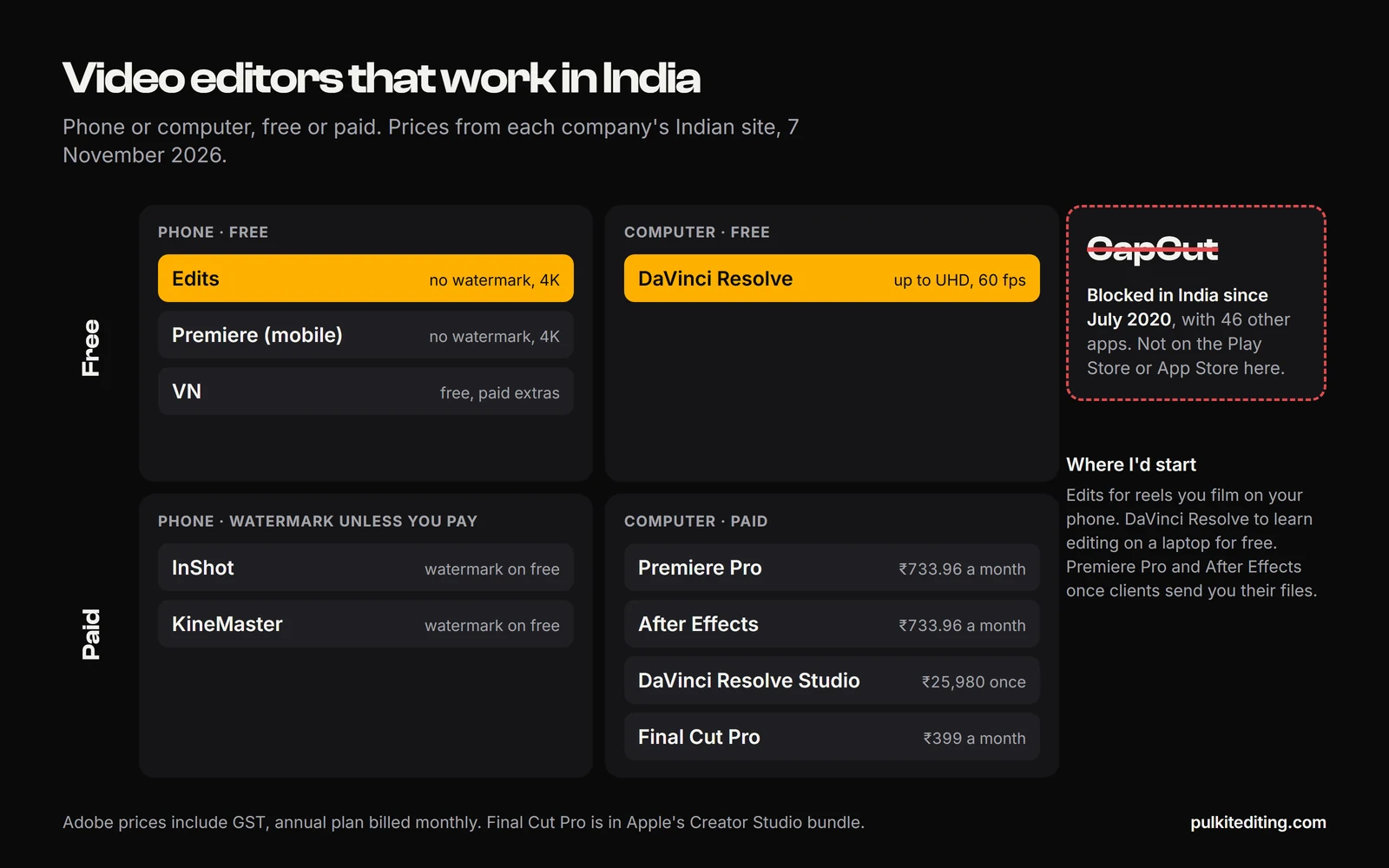
No. CapCut, owned by ByteDance, was among the 47 apps the government blocked in July 2020, a few weeks after TikTok and 58 others. It isn't on the Play Store or the App Store in India. People run it through VPNs, but that doesn't change the block, and the footage still goes through an app the government has blocked. I don't put client footage through workarounds, so everything below works in India without one.
CapCut alternatives in India, compared
| App | Runs on | Price in India | Good for | Watch out for |
|---|---|---|---|---|
| Edits | Android, iPhone | Free, no watermark | Reels shot on the phone: captions, cut-outs, green screen, 4K export | Built around Instagram |
| Premiere (mobile) | iPhone; Android 13+ with 5 GB RAM | Free, no watermark | Clean cuts, titles and audio, up to 4K | Generative AI tools need paid credits |
| VN | Android, iPhone | Free, some paid extras | Layered edits with keyframes and AI cut-out | Some features are paid |
| InShot, KineMaster | Android, iPhone | Free with watermark | Quick simple edits | Paying to remove the watermark |
| DaVinci Resolve | Windows, Mac, Linux | Free | Full editing, colour and sound; up to 60 fps in Ultra HD | Magic Mask and AI subtitles need Studio |
| DaVinci Resolve Studio | Windows, Mac, Linux | ₹25,980 once | AI masking, subtitles, higher frame rates | Needs a strong graphics card |
| Premiere Pro | Windows, Mac | ₹733.96 a month | Client work and agencies; text-based editing, Object Mask | Annual plan, billed monthly |
| After Effects | Windows, Mac | ₹733.96 a month | Motion graphics, tracking, cut-outs | A steep learning curve |
| Final Cut Pro | Mac, iPad | ₹399 a month (Creator Studio) or ₹29,900 once on Mac | Fast editing on Apple hardware | Apple only |
Adobe's prices are from its Indian plans page on 7 November 2026, including GST, for the annual plan billed monthly; the full Creative Cloud Pro bundle was ₹2,714 a month. Apple's Creator Studio, launched in India in January 2026, bundles Final Cut Pro with Logic Pro, Motion and other apps. Prices change often, so check before you pay.
On a phone: Edits, Premiere or VN?
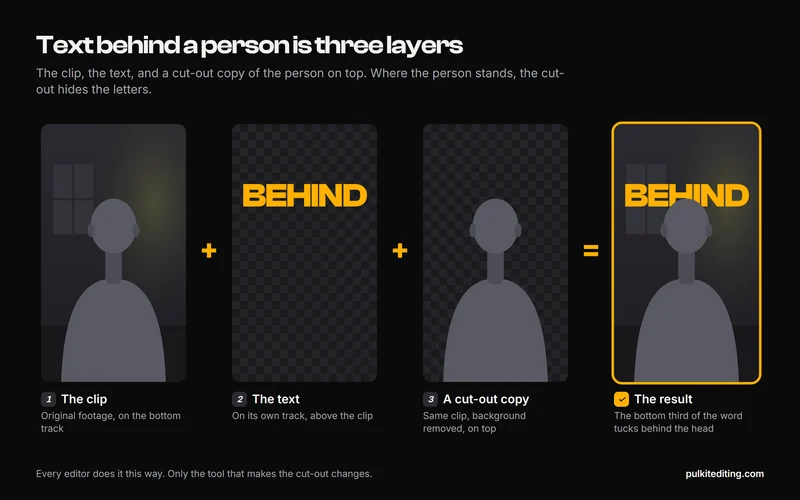
- Edits if you film on the phone and post to Instagram. It records up to 4K at 60 fps, edits without a watermark, writes captions (including bilingual ones with Hindi), cuts out people and objects, and has a teleprompter and green screen. Instagram's team also says reels shared straight from Edits get priority processing.
- Premiere mobile if you want a cleaner, more traditional timeline. Adobe launched it on iPhone in September 2025 and on Android in September 2026, free and without a watermark, with export up to 4K.
- VN if you want layers and keyframed motion on a phone: text that moves, overlays, cut-outs, picture-in-picture.
For a talking-head reel with captions, Edits is enough. For anything with layered motion graphics, move to a computer.
On a computer: Resolve, Premiere or After Effects?
- DaVinci Resolve (free) is the best place to learn editing without paying. The free version edits, colours and mixes sound up to 60 fps in Ultra HD. Studio adds Magic Mask, automatic subtitles and other AI tools for a one-time price.
- Premiere Pro is, in my experience, the editor that agencies, brands and other editors most often expect project files in, which matters once you work with teams. Recent versions added text-based editing (cut by deleting words from a transcript) and Object Mask (one-click cut-outs). With version 26, in January 2026, Adobe renamed the desktop app Adobe Premiere; I still call it Premiere Pro here because that is the name people search for.
- After Effects is for motion graphics: animated text, tracking, cut-outs, anything built frame by frame. It works alongside Premiere through Dynamic Link.
- Final Cut Pro is fast and smooth on a Mac, and Apple's ₹399-a-month Creator Studio made it much cheaper to start with. It is less common in agency handoffs.
What I use, and why
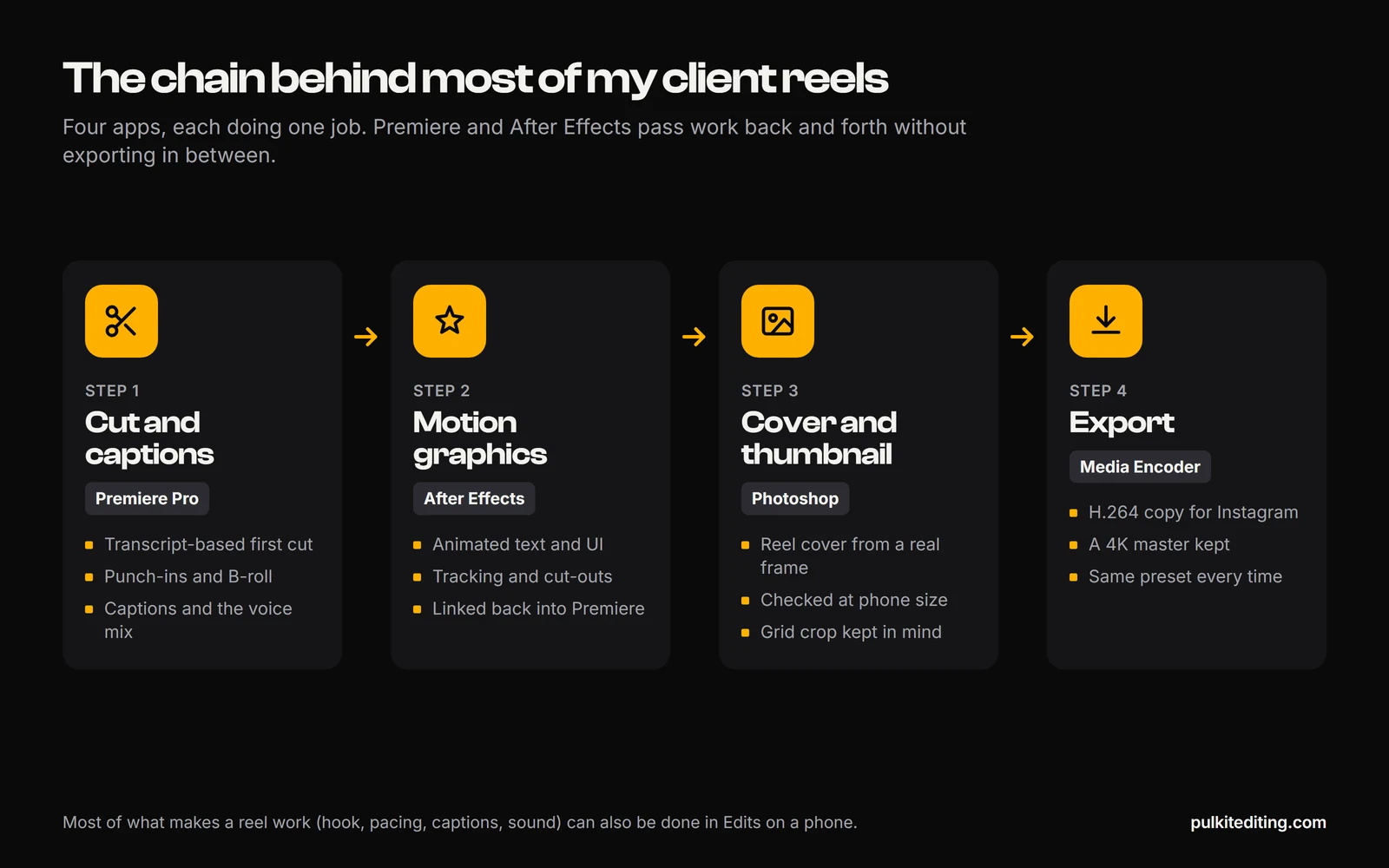
I cut in Premiere Pro, build motion graphics and cut-outs in After Effects, make covers in Photoshop, and export through Media Encoder. The reason is mostly other people: clients, agencies and other editors can open the files, and Premiere and After Effects pass work back and forth without exports in between.
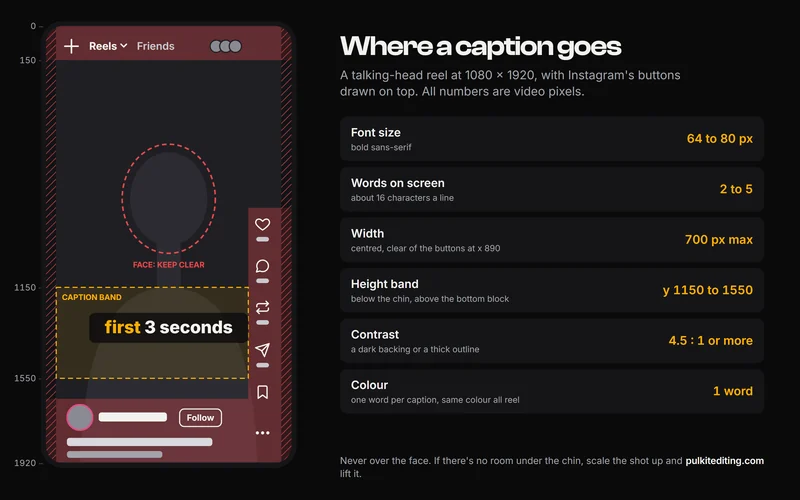
Having the software is a small part of it, though. Most of what makes a reel work, like the hook, the pacing, captions in the right place and sound on every change, can be done in Edits on a phone.
Two ways to start
- Spending nothing: Edits on the phone for reels you film yourself, DaVinci Resolve on a laptop for everything else. Learn cutting, captions and sound first.
- Working for clients: Premiere Pro and After Effects, because that is what the people you'll work with use. Start with Premiere alone and add After Effects when the work asks for motion graphics.
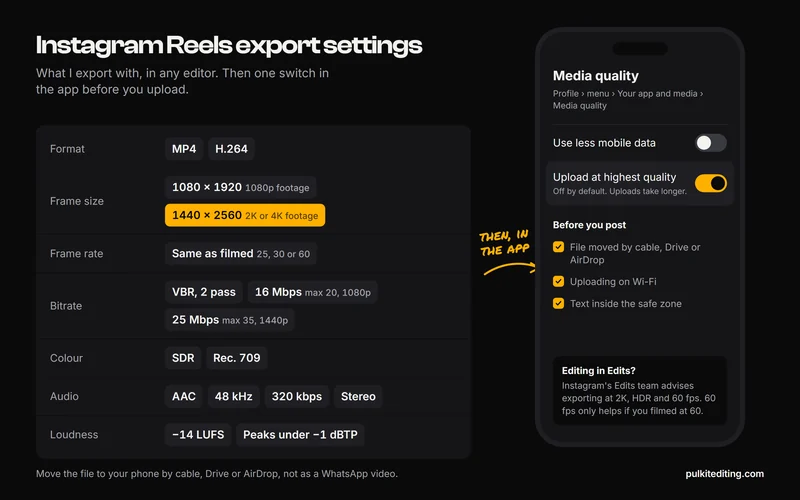
Whichever you pick, the export matters as much as the edit. The exact settings for each app are in export settings for Instagram Reels.
Questions people ask
Is CapCut banned in India?
Yes. CapCut was among the 47 apps India blocked in July 2020, and it is still not on the Play Store or App Store in India. Using it through a VPN doesn't change the block.
What is the best CapCut alternative in India?
For reels filmed on a phone, Edits, Instagram's free editor: it records up to 4K, exports without a watermark, writes captions (including Hindi), cuts out people and has keyframes. For layered motion graphics, use a computer: DaVinci Resolve is free, and Premiere Pro with After Effects is what most agencies work in.
What is the best free video editing app without a watermark in India?
On a phone, Edits (Instagram's editor) and Adobe's Premiere app are free with no watermark, and VN is free with some paid extras. On a computer, DaVinci Resolve is free.
Which software do professional video editors in India use?
In my experience, Premiere Pro and After Effects are the most common in agency and brand work, with DaVinci Resolve popular for colour and with editors starting out. I edit client work in Premiere Pro and After Effects.
Can I edit reels on a laptop for free?
Yes. DaVinci Resolve is free on Windows, Mac and Linux and edits up to 60 fps in Ultra HD. Set the timeline to 1080 × 1920 before you start.
Sources
- Xiaomi Browser, ByteDance’s CapCut among 47 Chinese apps banned by India, Inc42, July 2020
- Best camera and export settings for high-quality Instagram Reels, Instagram for Creators
- Adobe Premiere launches on Android, 9to5Google, September 2026
- Rebranded Adobe Premiere 26 arrives with one-click object tracking, PetaPixel, January 2026
- Creative Cloud plans and pricing, Adobe India (prices incl. GST, checked 7 November 2026)
- DaVinci Resolve Studio, Blackmagic Design India
- Apple Creator Studio launched in India at ₹399 a month, Free Press Journal
- Instagram adds new features to Edits, including keyframes, Social Media Today