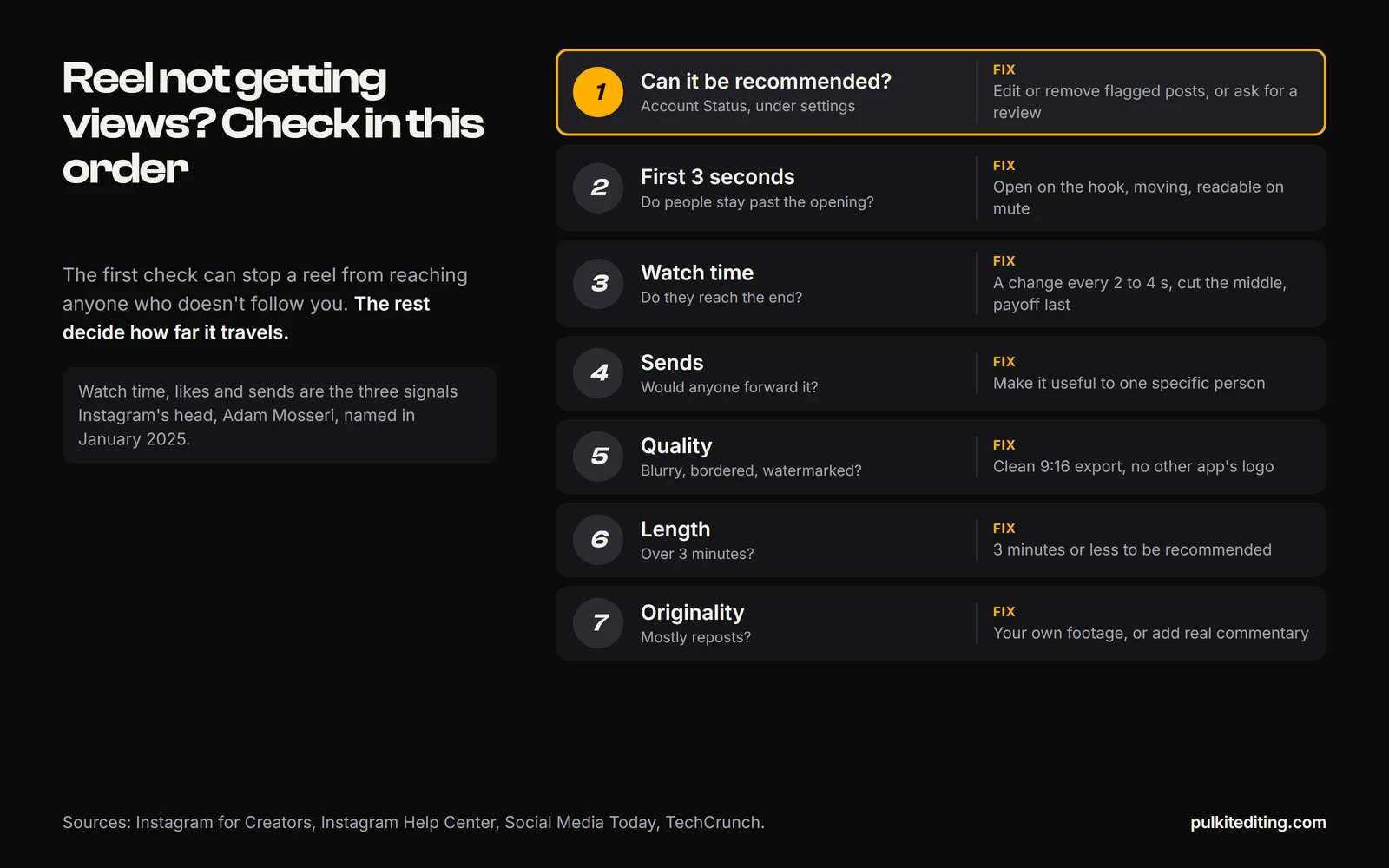
In short: check in this order. First, Account Status: if your account or a reel isn't eligible for recommendations, people who don't follow you won't see it, however good it is. Then the first 3 seconds, because Instagram's head, Adam Mosseri, names watch time, likes and sends as the three signals that matter most. Then quality (Instagram tells creators not to post blurry or watermarked reels), length (a reel must be 3 minutes or less to be recommended) and originality (accounts that mostly repost other people's content lose recommendations).
Check in this order
When a reel stalls, the instinct is to blame the algorithm or the hashtags. I go through the same list every time, from the things that block a reel completely to the things that slowly cost views.
1. Can Instagram recommend your reels at all?
Instagram shows recommended reels to people who don't follow you, and it holds those to stricter rules than what your followers can see. Content that breaks the recommendation guidelines still reaches your followers, but Instagram tries not to show it to anyone else. If an account repeatedly posts that kind of content, the whole account can stop being recommended for a while.
- Open Account Status from your profile's settings and check whether your content can be recommended. If something is flagged, edit or delete it, or ask for a review if you think it's a mistake.
- Know what's on the list: violence, sexually suggestive content, promotion of regulated products such as tobacco, vapes or weight-loss products, and unoriginal content that is mostly repurposed from somewhere else with only minor edits.
- Only public accounts are recommended. Creator and business accounts are public automatically.
2. The first 3 seconds
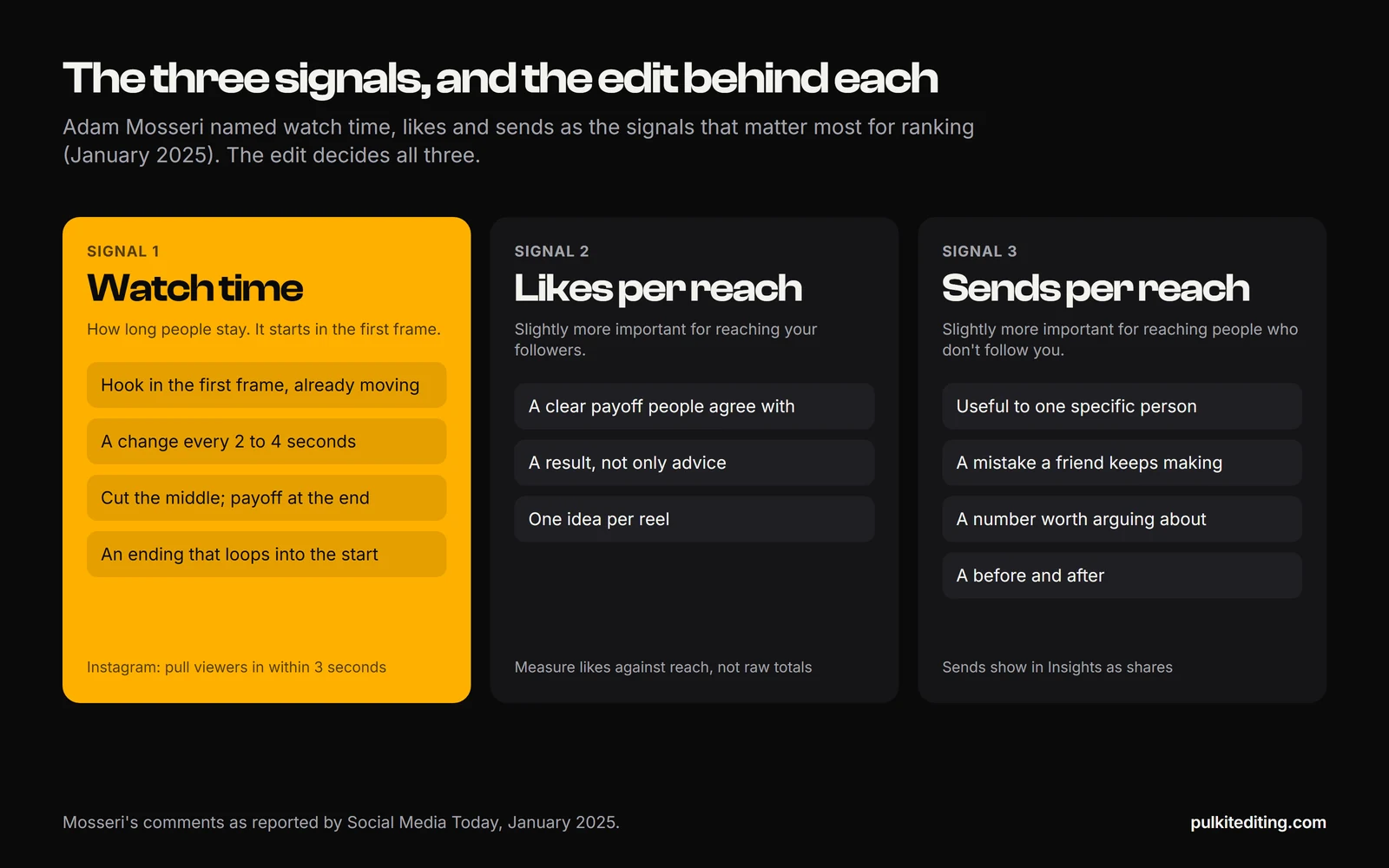
Instagram's advice to creators is to pull viewers in within the first 3 seconds. In January 2025, Mosseri said the three signals that matter most for ranking are watch time, likes and sends, and watch time starts in the first frame.
- Start on the hook. Cut the greeting, the logo sting and the slow walk into frame.
- Make the first frame a finished picture: the face or the product, the hook in text, and something already moving.
- Assume mute. If the opening needs sound to make sense, put it on screen as text.
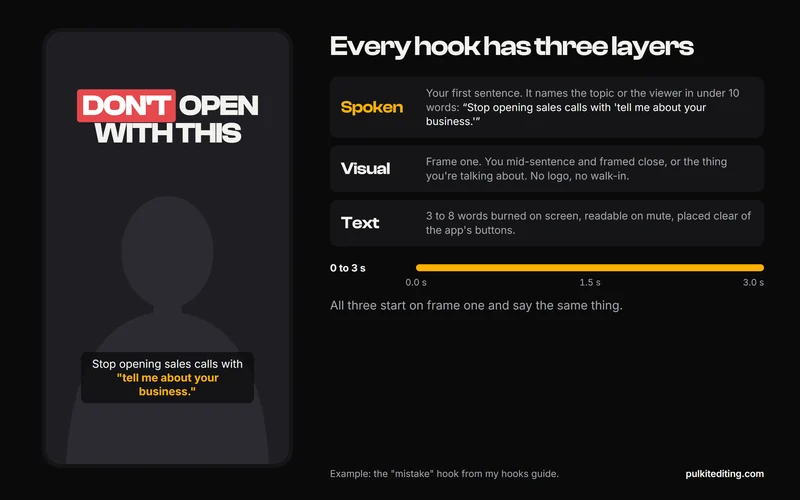
The three parts of a hook (spoken, visual and on-screen text) are in video hooks for founders, and they work the same for any reel.
3. Watch time: hold them to the end
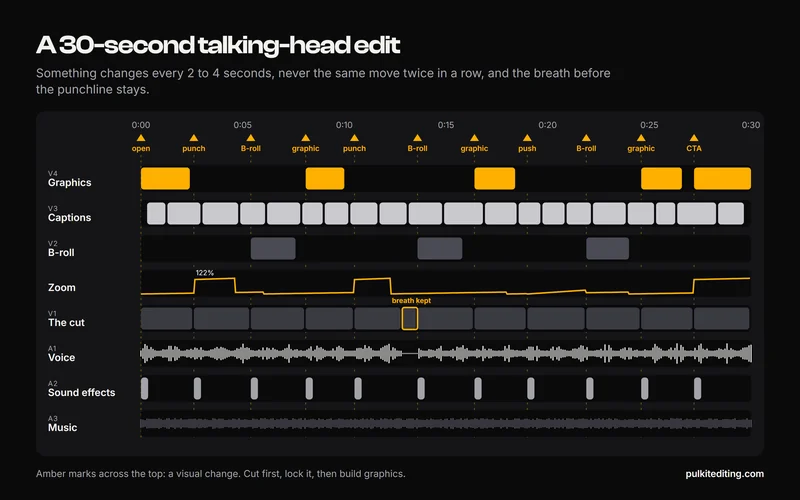
- Change something every 2 to 4 seconds: a punch-in, a cut, a graphic, a caption beat.
- Cut the middle hard. Most reels have one point repeated three ways; keep the best one.
- Put the payoff at the end, so there's a reason to stay.
- Let the last frame lead back into the first, so a replay feels natural.
My full editing process for this is in how to edit a talking-head video.
4. Give people a reason to send it
Mosseri has said likes matter slightly more for reaching your followers, and sends matter slightly more for reaching people who don't follow you. People send a reel when it is useful to one particular person they know: a tip a friend needs, a mistake a colleague keeps making, a number worth arguing about.
- Write the reel for one person who would forward it, and make the point specific enough that they think of someone.
- Show a result. A before-and-after travels further than a list of tips.
5. Quality: blurry, bordered or watermarked
Instagram tells creators to post high-resolution 9:16 reels with no borders, where text doesn't cover most of the screen, and not to post reels that have watermarks or are blurry or otherwise low quality.
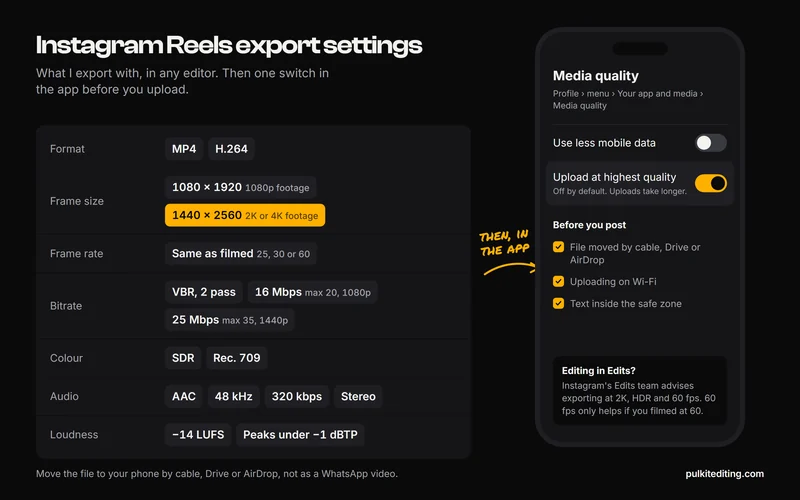
- Export properly and upload with the highest-quality setting on. The settings for each app are in export settings for Instagram Reels.
- No watermarks from other apps, and no black bars from a 16:9 clip dropped into a vertical frame.
- Keep text inside the area the app doesn't cover. The measured safe zone shows exactly where that is.
- Add sound. A silent reel gives viewers less reason to stay.
6. Length
To be recommended, a reel has to be 3 minutes or less. Instagram raised that limit from 90 seconds in January 2025. Longer reels still reach your followers. Within the limit, the right length is the shortest one that still delivers the point; a 25-second reel people finish beats a 90-second one they leave halfway.
7. Originality
Instagram's guidelines say it doesn't recommend unoriginal content that is largely repurposed from another source with only minor, immaterial edits. In April 2026 it extended its crackdown on aggregator accounts from reels to photos and carousels: accounts that repeatedly post content they didn't create or meaningfully improve drop out of recommendations, and become eligible again only after they stop.
- Film your own footage, or add something real to what you use: commentary, a breakdown, a remix that changes it.
- When you make something with another creator, post it once as a Collab instead of both uploading it.
What doesn't fix it
- Hashtags. Since December 2025 Instagram allows at most five per post. Use them to describe the topic; they won't rescue a reel people swipe away from.
- Keywords in the comments. Instagram matches search to the text of your caption, so put the words people search for in the caption.
- Posting the same file again. If the first seconds lost people once, they will again. Re-edit the opening instead.
Test openings with trial reels
Instagram added trial reels in December 2024: they are shown to people who don't follow you before your followers see them. That makes them a cheap way to test two openings for the same reel. Change only the first 3 seconds, post both as trials, and keep the version people watch longer.
Read your own numbers
In Insights, compare each reel with your own typical reel, not with someone else's viral one. Look at how much of the reach came from non-followers, the average watch time, and likes and shares relative to reach. A reel with good watch time and few shares needs a more useful point; a reel nobody watches past 3 seconds needs a new opening.
Questions people ask
Why did my reel views suddenly drop?
Check Account Status first: if a post broke the recommendation guidelines, your content may not be shown to non-followers for a while. If everything is eligible, compare how many people leave in the first 3 seconds, and the shares per reach, with your earlier reels.
Do hashtags help reels get more views?
Not much on their own. Since December 2025 Instagram allows up to five per post. Use them, and keywords in the caption, to say what the reel is about; the views come from people watching and sharing.
How long can a reel be and still be recommended?
3 minutes or less. Instagram raised the limit from 90 seconds in January 2025. Longer reels still reach your followers.
Do watermarks stop reels from being recommended?
Instagram tells creators not to post reels with watermarks or that are blurry or low quality, because they look recycled. Export clean files, and don't repost videos with another app's logo on them.
What are trial reels?
Reels that Instagram shows to people who don't follow you before your followers see them. They are a cheap way to test two openings for the same reel.
Sources
- What creators need to know about Instagram recommendations, Instagram for Creators
- Recommendations on Instagram, Instagram Help Center
- Instagram shares insights into its algorithm for 2025, Social Media Today
- Instagram restricts reach of content aggregators in new crackdown, TechCrunch, April 2026
- Instagram limits hashtags to 5 per reel and post, Business Today, December 2025
- Instagram gives equal recommendation to reels up to 3 minutes, Net Influencer
- Instagram launches trial reels, Social Media Today, December 2024