In short: edit to the words. Transcribe the recording, cut dead air, stumbles and retakes, but keep the short breath before a point lands. Open on the hook with something already moving in the first frame, then change something every 2 to 4 seconds (a punch-in, a cut, a graphic, a caption beat) without using the same move twice in a row. Reframe so graphics sit below the chin, never on the face, and finish with captions, sound effects on the visual changes and a master at about −14 LUFS.
Before the first cut
- Watch the whole recording once without touching it. Then write the story in four lines: the hook, the points, the payoff and the ask. Anything that serves none of them is a candidate to cut.
- Pick the best take of each line. People often say a line well on the second or third try, after a stumble, so the best version may be in the middle of a long clip.
- Transcribe it. A word-level transcript turns an hour of scrubbing into ten minutes of reading. In Premiere Pro, text-based editing lets you cut the video by deleting words from the transcript.
The first cut: edit to the words
- Cut dead air, false starts, repeated sentences and filler ("um", "so basically", "you know").
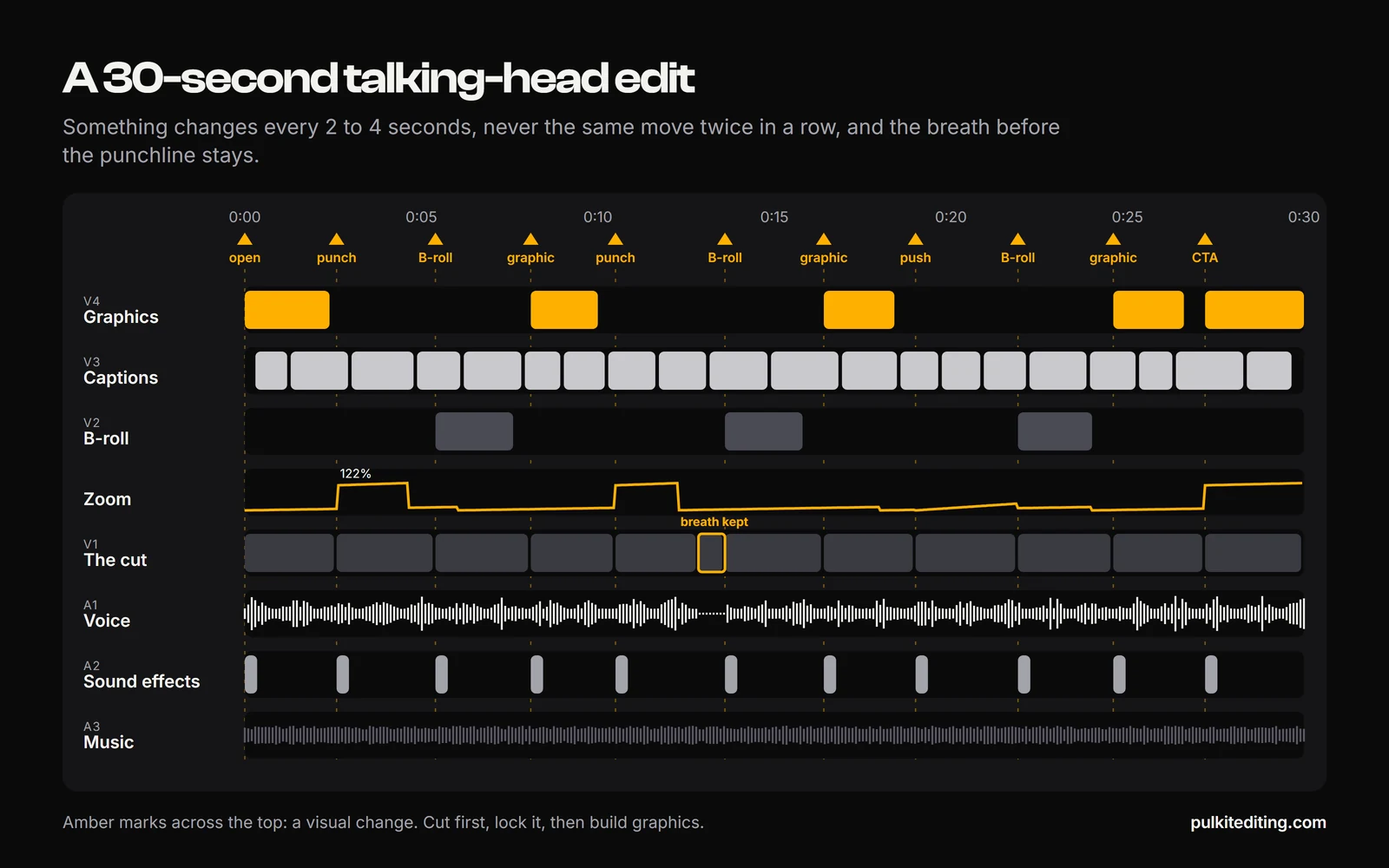
- Keep the pauses that carry timing: the breath before a punchline, the beat after a question. Premiere can find every pause and filler word and delete them in one click, but bulk deletion removes those pauses too, so I go through them line by line.
- Cut on the word. Start each clip on the first sound of the word, not on the breath before it, and end after the last consonant.
- Lock the cut before building graphics. Every later trim shifts everything above it. When a client change comes in after the graphics are done, I work from a map of where each source moment landed in the edit, so the graphics stay locked to the words.
Open with the hook, moving from the first frame
Start on the strongest line, even if it was said later in the recording. Nobody needs the greeting; the name is already on the post.
The first frame should be a finished picture that makes sense on mute: the face, the hook in text, and something already moving. I open every video with motion graphics from frame one, never a bare face with a slow zoom. Instagram's own advice to creators is to pull viewers in within the first 3 seconds. The three parts of a hook (what people hear, see and read) are in video hooks for founders.
Change something every 2 to 4 seconds
A picture that holds still for long loses people. So every 2 to 4 seconds something changes: a punch-in, a cut to B-roll, a graphic arriving, a caption beat on an important word. In the fast talking-head reels I study as references, a new kind of effect arrives about every 2.5 seconds, and the same move rarely appears twice in a row.
Even in a long, calm hold, the camera never fully stops. A slow push of 2 to 7% across the sentence keeps the frame alive without anyone noticing it.
Zooms and punch-ins
- A slow push, from 100% to about 106% across a sentence, builds attention. Ease it so it starts gently and settles.
- A punch-in, an instant jump to 115 to 130%, lands a line that matters or hides a jump cut.
- Alternate the framing at jump cuts: wide, tight, wide. Two cuts at the same size look like a glitch; a change of size looks intended.
- Arrive fast and land softly, without bouncy easing.
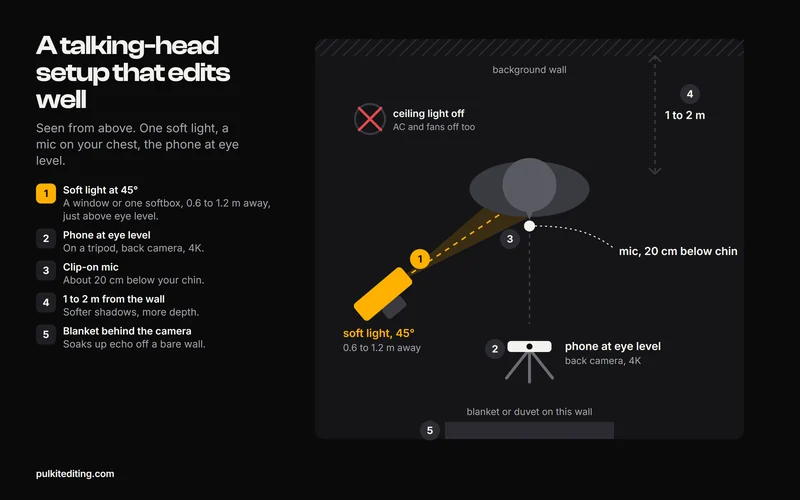
- Check how far you can push before the image goes soft. A vertical crop from horizontal 4K leaves about 1.12× of clean zoom; vertical 4K gives much more. The maths is in how to film a talking-head video on your phone.
Reframe for graphics, and keep the face clear
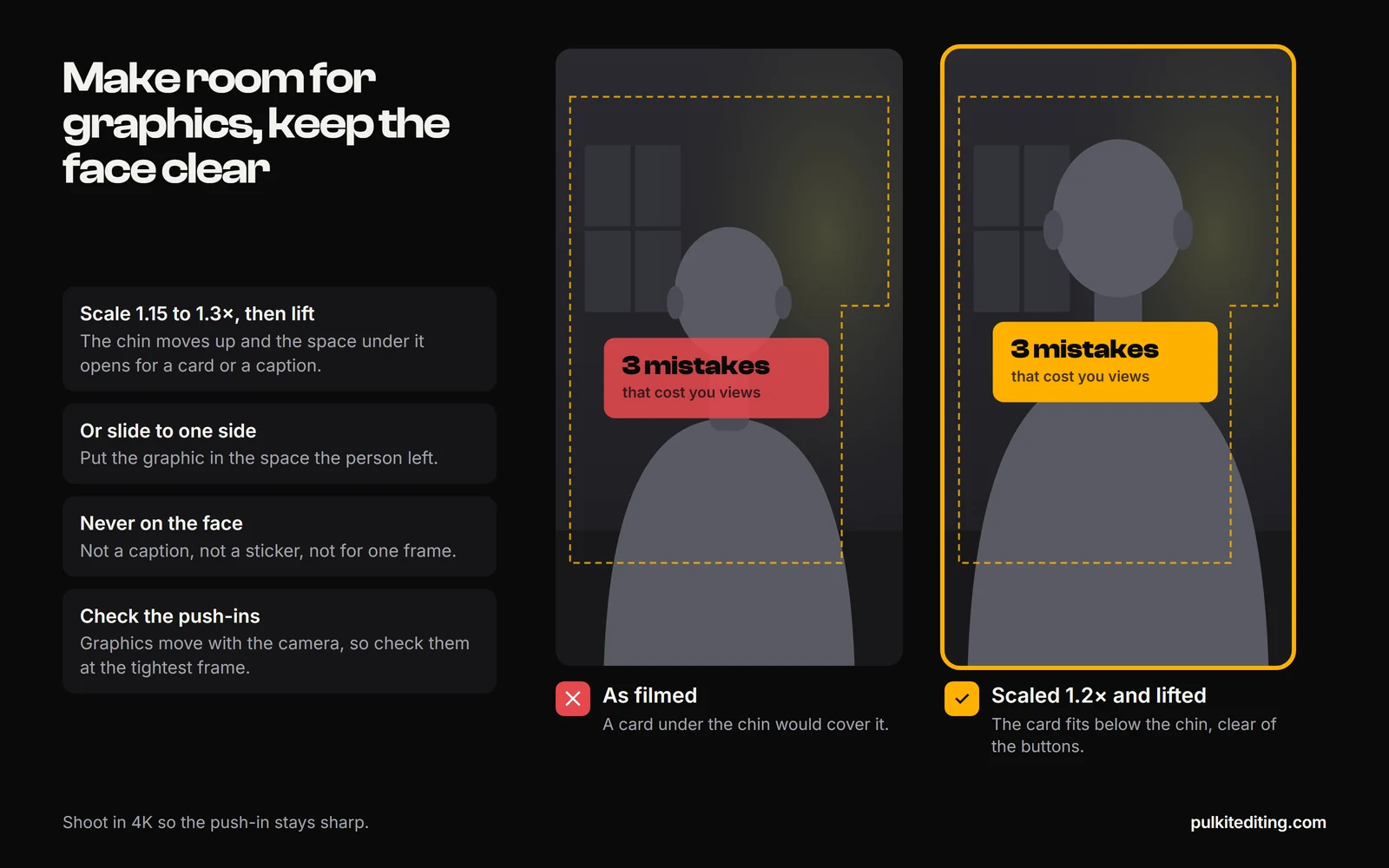
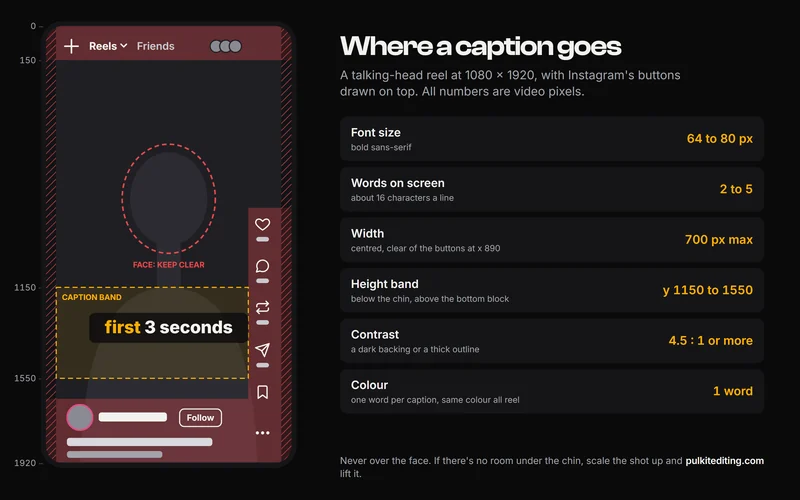
Text and graphics never go over the face. To make room, I scale the shot to 1.15 to 1.3× and lift it, so the chin sits higher and graphics fit below it, or slide the person to one side and put the graphic in the space they left.
- Graphics can also sit behind the head, with the person cut out in front. That method is in how to put text behind a person.
- Keep one look per video: one palette, one type style, one kind of motion.
- When the camera pushes in, the graphics move with it. Graphics that stay still while the shot zooms look pasted on.
B-roll and graphics that say what the line says
- Cover cuts with B-roll that shows the thing being talked about: the product, the screen, the place, the document. One to two seconds each.
- Specific B-roll holds attention better than stock footage of someone typing: a screenshot of the app you're talking about, a search being typed, the real invoice.
- Each graphic should act out the line. If the line is "most people quit in the first week", show a calendar with day 7 struck through, not a word that says QUIT.
Captions and sound
- Captions go below the chin, two to five words at a time, with one word in colour. Font, size and placement are in the best font for reel captions.
- Clean the voice before anything else: light noise reduction, gentle compression, and a cut in the muddy low-mids.
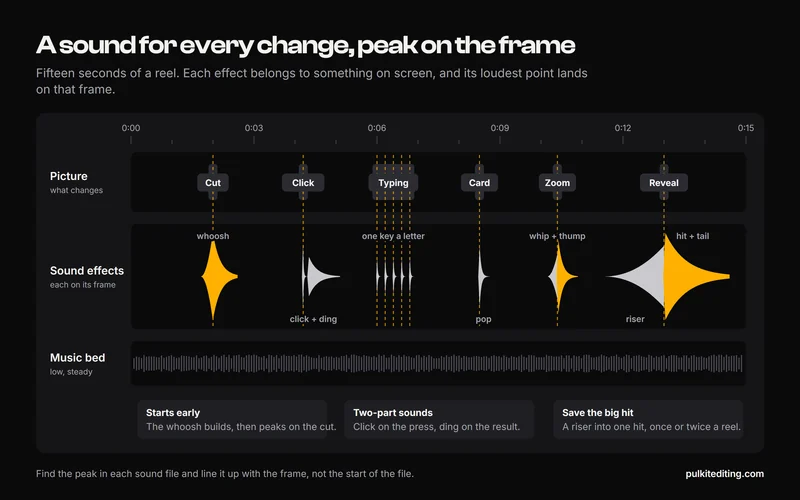
- Put sound effects on the visual changes (a pop for a graphic, a whoosh for a real scene change), about 6 dB under the voice, with music lower still. The full method is in sound effects for reels.
- Master the finished reel to about −14 LUFS, with peaks under −1 dB.
The final check
- Watch it on a phone, full screen, with sound.
- Watch it again on mute. If the story falls apart, the captions or the on-screen text need work.
- Lay the safe-zone overlay on top and pause on five random frames. Nothing important should touch the app's buttons.
- Check that the face is never covered, and read every name and number in the captions.
- Export with the right settings for Instagram.
Talking-head reels I edited
An educational reel for an IVF clinic, with the points appearing beside the doctor, and two question-and-answer reels for PrepGenix, where the presenter shares the frame with a question card.
Questions people ask
How do you make a talking-head video less boring?
Change something every 2 to 4 seconds: a punch-in, a cut to B-roll, a graphic or a caption beat, never the same move twice in a row. Start on the hook, keep the face clear of graphics, and put sound on the visual changes.
How often should I zoom in a talking-head video?
Some change should land every few seconds, and zooms are one kind. Mix slow pushes across a sentence with instant punch-ins on the lines that matter, and alternate wide and tight framing at jump cuts.
Should I remove all the pauses?
No. Remove dead air, stumbles and filler, but keep the breath before a punchline and the beat after a question. Bulk pause deletion removes those too, so check the cuts line by line.
What is the fastest way to edit a talking-head video?
Work from a transcript. Premiere Pro's text-based editing lets you cut by deleting words, and finds pauses and filler words for you. Then lock the cut before adding graphics.
How long should a talking-head reel be?
As long as the point needs and no longer. Instagram recommends reels of up to 3 minutes to people who don't follow you, but a short reel people finish does better than a long one they leave.