In short: every sound effect needs something on screen to belong to. A whoosh goes on a real scene change, a click on an on-screen click, a key tap on each typed letter, a pop when something appears, a hit on a reveal. Line up the loudest moment of each sound with the frame it belongs to, keep effects about 6 dB under the voice and the music lower still, and master the reel to about −14 LUFS with peaks under −1 dB. For free sounds you can use in client work, start with Pixabay, Mixkit, Sonniss's GDC bundles and Freesound's CC0 sounds, and check the licence of each.
Which sound goes on which moment
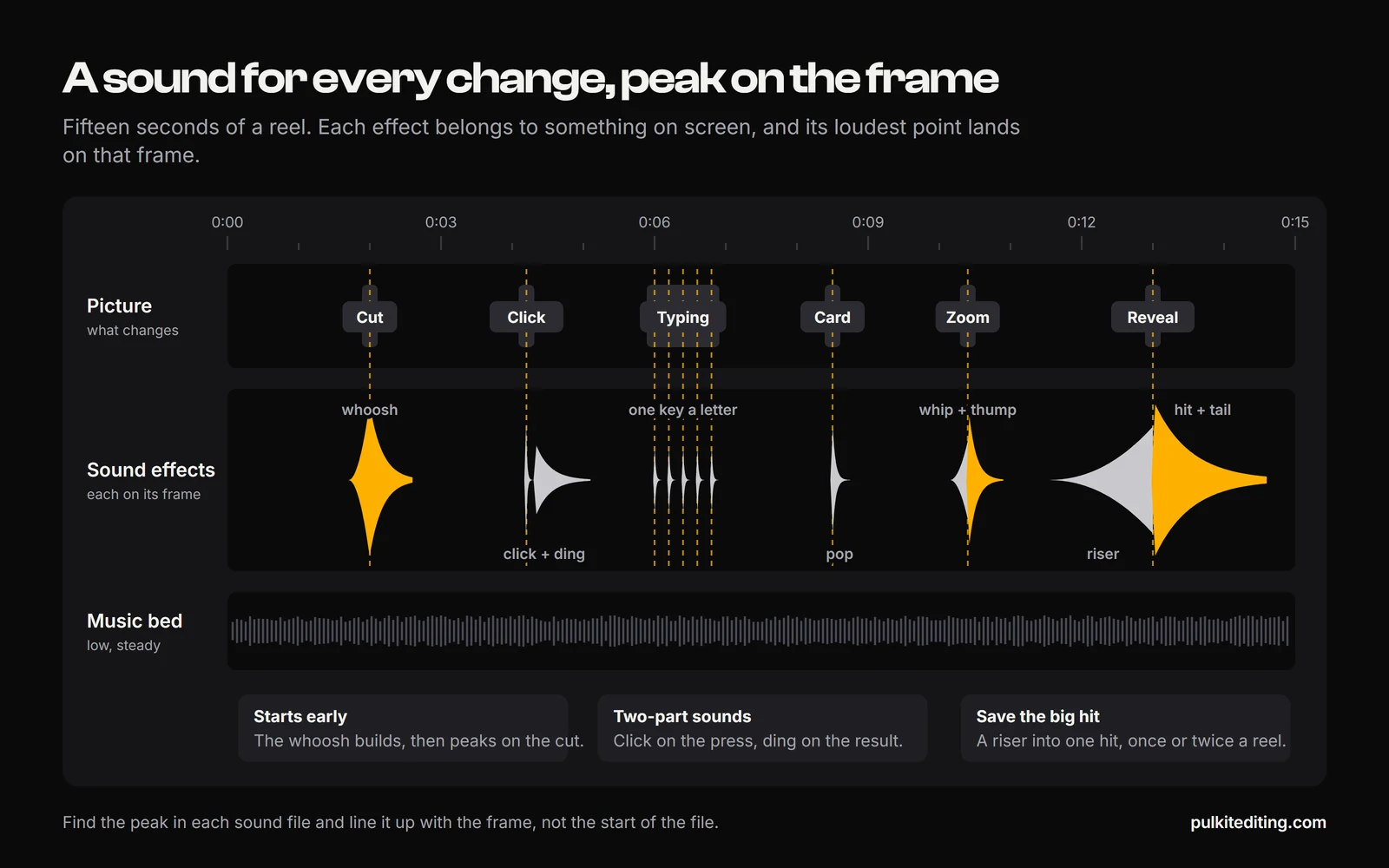
The fastest way to make a reel sound cheap is the same whoosh on every cut. I pick each sound from what moves on screen, so the sound tells the ear what the eye is seeing.
| On screen | Sound | Notes |
|---|---|---|
| A scene change or a fast move | Whoosh | Only on real changes. Its speed should match the move |
| A cursor clicks a button | Mouse click, then a soft ding if something changes | The ding marks the result, not the click |
| Text typing in | One key tap per letter | Vary the taps slightly so it doesn't sound like a loop |
| A card, icon or label appears | Pop or tick | Small and bright under a voice |
| A list builds line by line | A tick or ratchet per line | A bright pop for each ticked item |
| Something lands or drops | Low thump or snap | Heavier for bigger objects |
| A big reveal or the word that matters most | Riser into a hit | Save these for one or two moments per reel |
| Paper, stickers or cut-outs | Paper slap or tear | Match the material on screen |
| A freeze frame | Camera shutter | Close on the freeze, open when it plays again |
| The logo or end card | A clean chime with a long tail | Let it ring out; don't cut the tail |
Many good sounds come in two parts: a press and a release, a flint and a flame, a shutter closing and opening. Give each part its own visual moment instead of firing both at once.
Timing: put the peak on the frame
Most sound files have a little silence or a build-up before the loudest point. If you drop the file where the visual starts, the hit lands late. Find where the peak is in the file (zoom into the waveform), and place the clip so that peak sits on the frame.
- Transitions: start the whoosh 100 to 300 milliseconds before the cut, so it peaks on the first frame of the new shot, then let a low tail or a chime ring after it.
- Snap zooms: a short, dry whip plus a low thump on the frame where the zoom lands.
- Drags: one continuous swish that speeds up and slows down with the dragged object, instead of a whoosh at each end.
- Typing: one key per letter, on the frame each letter appears.
How many effects
It depends on the edit. In five fast motion-design reels I broke down for reference, effects landed about 2 to 2.6 times a second, and the soundtrack was silent only 3 to 7% of the time. That density works when the picture changes that often.
Under a voice, I keep it lighter: small, bright clicks, pops and ticks on graphics, and the heavy hits saved for one or two big transitions. If a sound doesn't belong to a change on screen, it comes out.
How loud: voice, effects and music
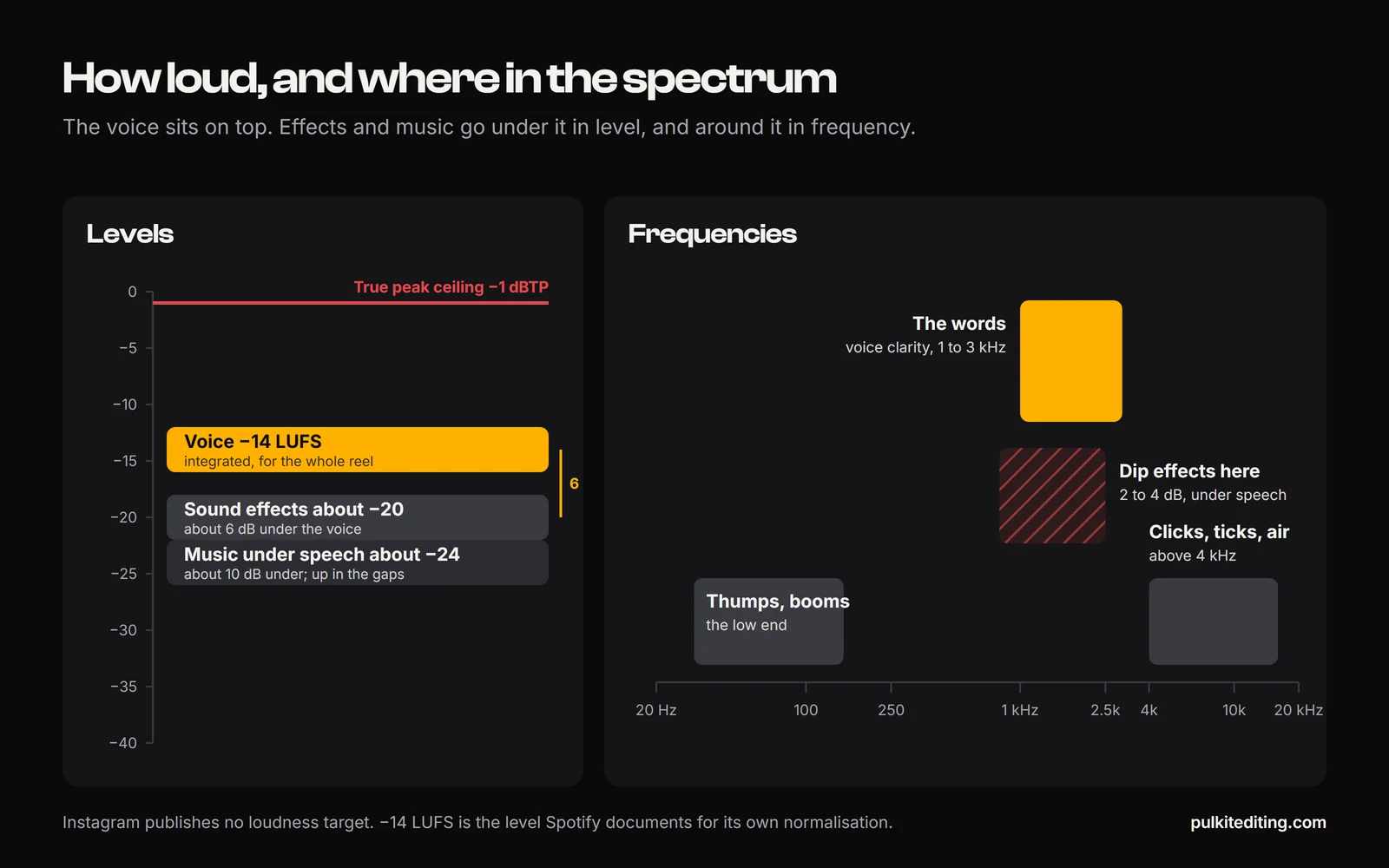
- Voice on top. Clean it first: light noise reduction, a little compression, and cut muddy low-mids.
- Effects about 6 dB under the voice. Repeated small sounds (typing, ticks) can go lower still.
- Music under speech. I keep the bed about 10 dB below the voice while someone talks, and let it come up in the gaps.
- Leave the voice its space. The words live roughly between 1 and 3 kHz, so I keep effects in the low end (thumps and booms) and above about 4 kHz (clicks, ticks, air), and dip effects by 2 to 4 dB between about 0.8 and 2.5 kHz when they sit under speech.
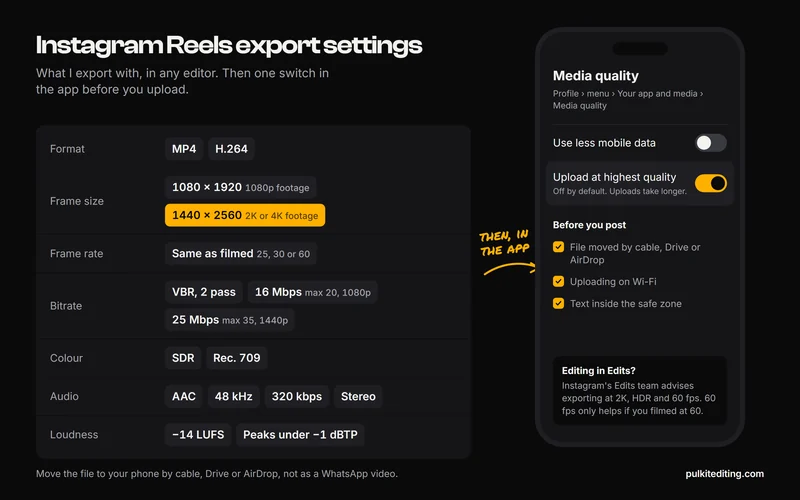
- Master to about −14 LUFS integrated, with true peaks under −1 dBTP. Instagram doesn't publish a loudness target; −14 LUFS is the level Spotify documents for its own normalisation and a sensible place for a reel to sit.
LUFS is a measure of perceived loudness across the whole clip, defined in the ITU-R BS.1770 standard and used by broadcasters through EBU R 128. Premiere's Loudness Radar, Resolve's Fairlight meters and free plugins like Youlean Loudness Meter all read it.
Layering sounds that feel expensive
- Build big moments in three parts: a whoosh in, a hit on the frame, and a tonal tail (a ring, a chime or a low boom) after.
- Put a riser before a reveal, so the ear expects it.
- Add a physical sound under digital ones: a paper flutter under a particle burst, a glass chime under a lens flare.
- Keep a quiet bed (room tone, a soft drone or the music) running, so the effects sit on something instead of in silence.
- When a delicate sound is the point of the moment, drop the bed for it, then bring the bed back.
- Don't repeat one sound on every beat. I keep my own library sorted by job, so I can reach for a different click or pop each time.
Free sound effects you can use in client work
| Source | Licence | Client work? |
|---|---|---|
| Pixabay | Pixabay Content License, no credit needed | Yes. Watch for sounds that include brands or other people's recordings |
| Mixkit | Mixkit sound effects licence, no credit needed | Yes. You can't resell the sounds on their own |
| Sonniss GDC bundles | Royalty-free, no credit needed | Yes. Since 2024 they can't be used to train AI |
| Freesound | Set per sound: CC0, CC BY or CC BY-NC | CC0 yes; CC BY with credit; CC BY-NC no |
| BBC Sound Effects | RemArc licence | No. Personal, educational and research use only |
| YouTube Audio Library | Written for use in YouTube videos | Check each track before using it anywhere else |
| Meme sound sites | Usually unknown | No. Many are clips of films, shows and games |
Licences change, so read the current one on the source's site before a sound goes into paid work, and keep a note of where each sound came from. If you edit for brands every week, a paid library is worth pricing against the time a copyright claim costs.
Music on business accounts
Instagram's licensed music library, the one with trending songs, is meant for personal, non-commercial use. Instagram says certain business accounts and certain types of posts don't get access to it, and that licensed music may not be available in some countries.
The alternative inside the app is Meta's Sound Collection: more than 14,000 royalty-free songs and sounds that Instagram says are safe to use in Reels and Stories, including for commercial purposes like ads. For Reels ads, Meta's ad guide rules out licensed music altogether. So for brand reels I use the Sound Collection, a properly licensed track, or original audio.
Reels where the sound design carries the cut
Three reels I edited and designed the sound for. Play them with the sound on and listen for which effect sits under which move.
The rest of a talking-head edit, from the first cut to the export, is in how to edit a talking-head video, and the export settings, loudness included, are in export settings for Instagram Reels.
Questions people ask
How loud should sound effects be in a reel?
About 6 dB quieter than the voice, and lower still for repeated small sounds like typing. Keep them mostly in the low end and above about 4 kHz, so they don't cover the words.
Where can I get free sound effects without copyright problems?
Pixabay, Mixkit and Sonniss's GDC bundles allow commercial use without credit, and so do Freesound's CC0 sounds. Check each licence on the source's site. Avoid the BBC archive for client work (personal and educational use only) and meme sound sites.
How many sound effects should a reel have?
One for each visual change that deserves it. Fast motion-design reels can carry two or more a second; a talking-head reel needs fewer, smaller ones, with heavy hits saved for one or two big moments.
What LUFS should an Instagram reel be?
Instagram doesn't publish a loudness target. I master reels to about −14 LUFS integrated with true peaks under −1 dBTP, the level Spotify documents for its own normalisation.
Can a business account use trending songs on Instagram?
Often not. Instagram says its licensed music library is for personal, non-commercial use and that certain business accounts don't get access. Use Meta's Sound Collection, which Instagram says is royalty-free and safe for commercial use, or properly licensed music.
Sources
- Loudness normalization on Spotify, Spotify for Artists
- EBU R 128: loudness normalisation and permitted maximum level of audio signals, EBU
- Content License Summary, Pixabay
- Mixkit License
- Frequently asked questions (licences), Freesound
- Sonniss GDC 2024 sound effects bundle and its licence, GameFromScratch
- BBC Sound Effects licensing (RemArc licence), BBC
- Access to the licensed music library on Instagram, Instagram Help Center
- Video ad specs for Instagram Reels, Meta Ads Guide