In short: record in 4K on the back camera with HDR off and exposure locked, at 25 fps in India. Put the phone on a tripod at eye level, frame from mid-chest up, and face a window or one soft light set 45 degrees to the side. Clip a mic about 20 cm below your chin. Pause for a second between points, clap before a retake, and send the original files, not WhatsApp copies.
What an editor can fix, and what they can't
Ten minutes of setup decides how far the edit can go. The left column below is normal editing work. The right column is where the footage sets a ceiling.
| Your editor can fix | Your editor can't really fix |
|---|---|
| Pauses, stumbles and retakes | Echo, wind, traffic or a fan humming under your voice |
| Slow pacing and long answers | A face that is too dark, or blown out by a window behind you |
| Captions, B-roll, graphics and music | Footage that is out of focus or shaky |
| Small changes to colour and brightness | Your head cut off, or no room left for text |
| Cutting one long video into short clips | A low-resolution copy sent over WhatsApp |
Everything below is about keeping you out of the right-hand column.
Phone settings to change before you record
Menu names here are from the iPhone (Settings > Camera > Record Video). Android phones have the same options in the camera app's settings.
- Use the back camera. It is the better camera on almost every phone. Use the front one only to check your framing.
- Record in 4K. It gives your editor room to punch in on your face and to crop a vertical video out of a horizontal one without it going soft. The next section shows the numbers.
- Pick the frame rate for your country. Mains power in India runs at 50 Hz, and indoor lights can flicker on camera at 30 fps. On an iPhone, turn on Show PAL Formats and record at 25 fps. In the US and Canada, use 30 fps.
- Turn HDR Video off unless your editor asks for it. HDR footage often looks washed out or too bright once it is posted.
- Lock focus and exposure. Tap and hold on your face until AE/AF Lock appears, so the brightness doesn't pump when you move. Turn on Lock White Balance so your skin tone stays the same.
- Wipe the lens, free up storage, charge to at least 50% and switch on Airplane Mode or Do Not Disturb.
Framing: eye level, mid-chest up, room to crop
Put the phone on a tripod, or a clamp on a stack of books, with the lens at your eye line. A camera looking up from a desk is the least flattering angle there is. Look at the lens, not at yourself on the screen.
Frame from mid-chest up, with your eyes about a third of the way down the frame and a small gap above your head. I can push in from there; I can't add back a forehead you cut off.
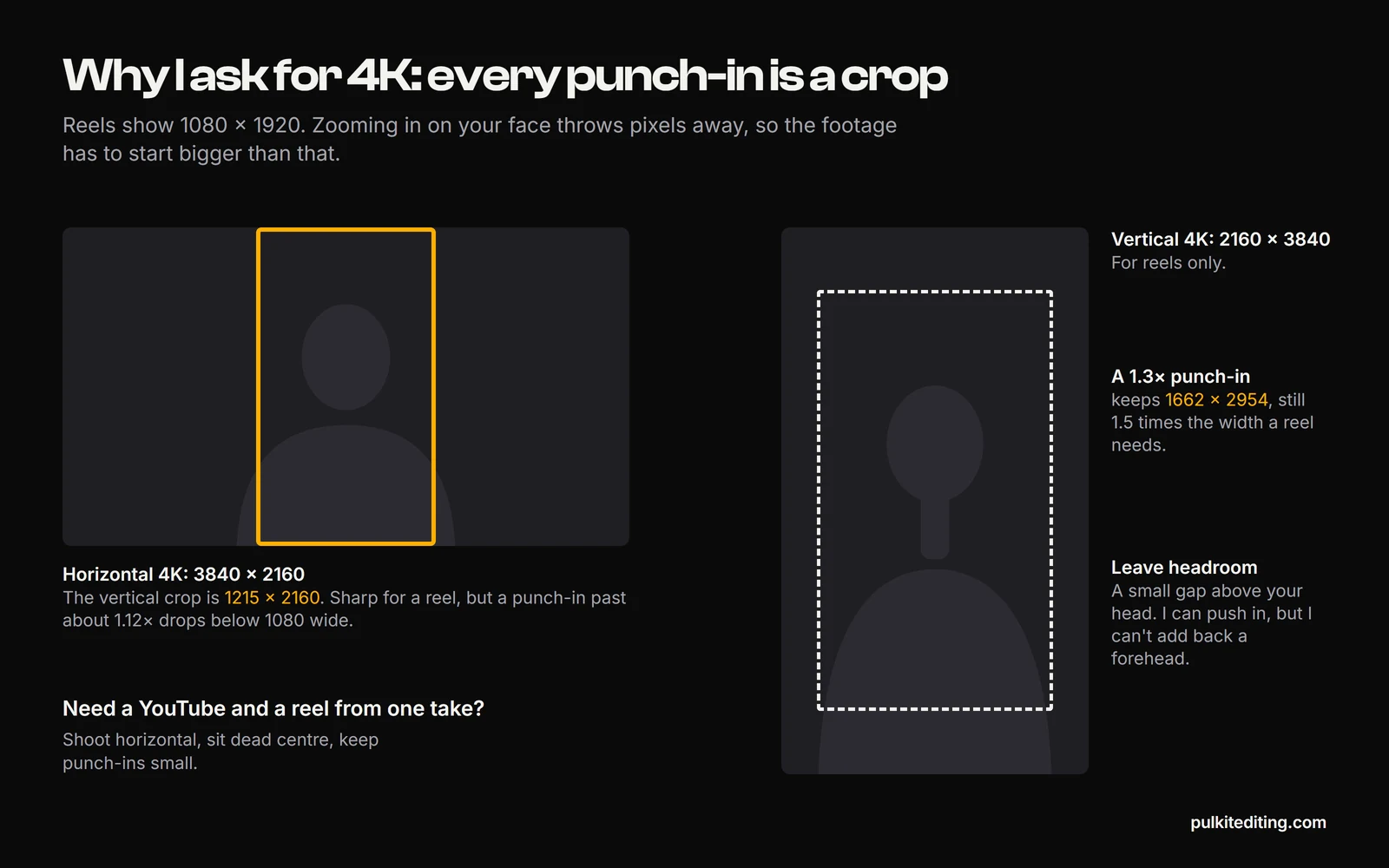
Here is why I ask for 4K. Reels show 1080 × 1920 pixels, and every zoom on your face throws pixels away.
- If the video is only for Reels and Shorts, record vertically. A 1.3× punch-in on vertical 4K still keeps 1662 × 2954 pixels, about one and a half times what the reel needs.
- If you also need a YouTube version, record horizontally in 4K and sit in the centre. The vertical crop is 1215 × 2160, sharp for a reel, but punch-ins past about 1.12× start to go soft. Keep them small.
Leave the middle of the frame for your face and anything you hold up. The app's buttons and caption cover the bottom and the right edge; my measured Reels safe zone has the exact pixels.
Sit 1 to 2 metres in front of your background. The shadows get softer and the shot gets depth. Tidy whatever is in view. Then record 10 seconds and play it back before the real take.
Light: one soft source at 45 degrees
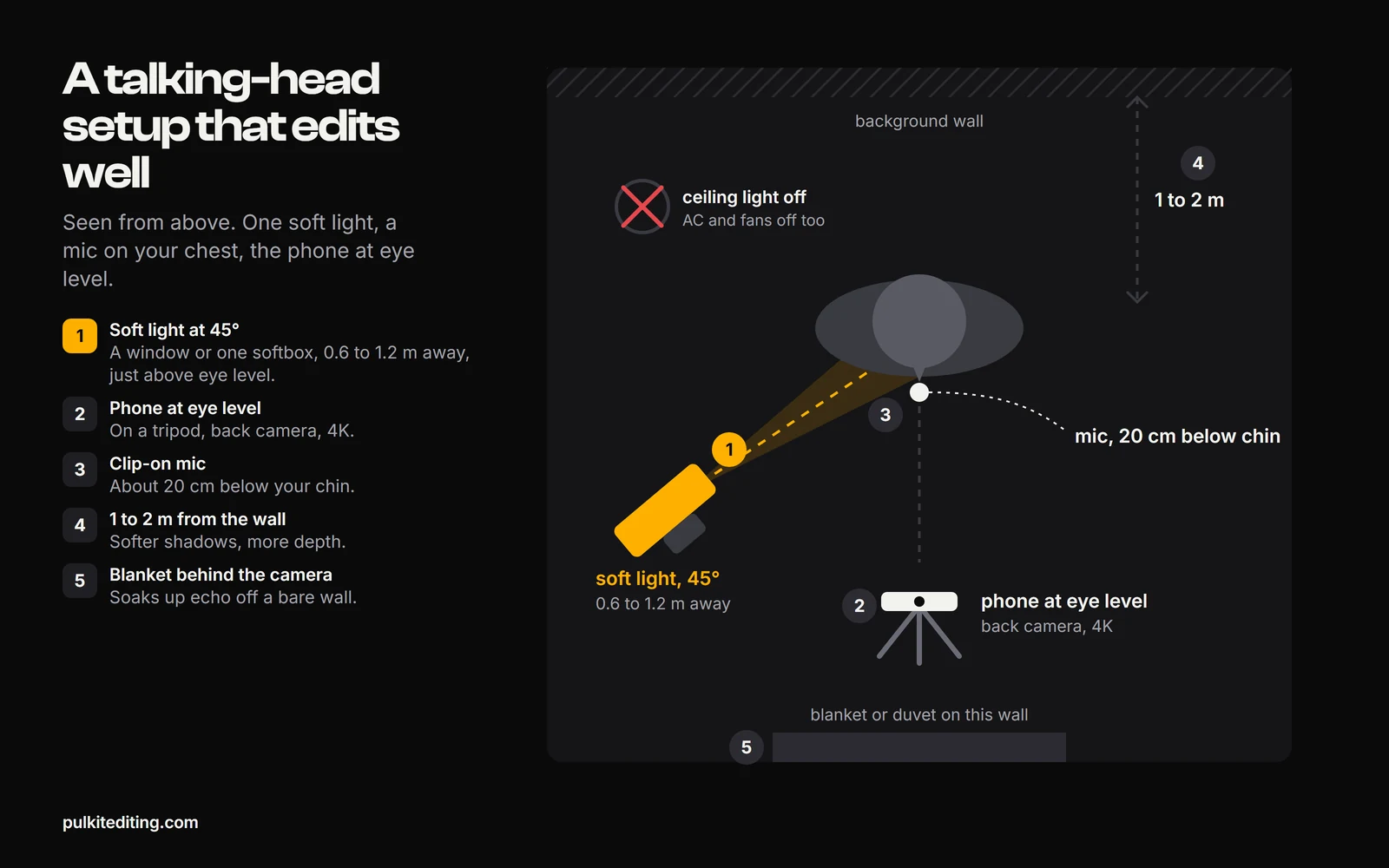
One big, soft light in front of you and a little to one side does more than any amount of gear behind you.
- The free option is a window. Sit facing it, or with it slightly to one side. Overcast daylight is ideal; direct sun throws hard shadows.
- Never put the window behind you. The phone exposes for the bright window and turns your face into a silhouette, and no edit brings that face back cleanly.
- If you buy one light, place it about 45 degrees to one side of the camera, just above eye level and angled down at your face, 0.6 to 1.2 metres away, with a softbox or diffusion in front.
- Switch off the ceiling light. Overhead bulbs put shadows under your eyes, and their warm colour mixed with daylight makes one side of your face orange and the other blue.
- If you wear glasses, raise the light and move it further to the side until its reflection leaves the lenses. A ring light straight in front is the worst case.
Record a batch of videos in one sitting, in the same spot with the same light, so they look like one series. Window light changes by the hour, so finish within an hour or two.
Sound: what viewers notice first
If you spend money on one thing, make it a clip-on mic. In a 2018 study reported by USC, researchers from USC and the Australian National University showed 196 people the same talks with clear or degraded audio. With bad audio, viewers rated the speakers as less intelligent and less likeable, and the research as less important. Same words, same person.
- Use a clip-on (lavalier) mic, wired or wireless. A phone's built-in mic a metre away records the room as much as your voice.
- Clip it above your sternum, about 20 cm below your chin. Higher and your chin muffles it; lower and the room creeps in.
- Wear cotton or wool. Silk and synthetics rustle against the mic. Keep necklaces, lanyards and hands away from it.
- If your wireless kit can record on the transmitter, switch that on as a backup.
- Choose a room with a rug, curtains, a sofa or a full bookshelf. Hang a blanket on the bare wall behind the camera if the room echoes.
- Switch off the AC and fans while you record. A steady hum can be reduced in the edit, but rarely removed without making your voice sound thin.
- Listen to your 10-second test on headphones, not the phone speaker.
How to talk so the edit goes fast
You don't need to be perfect on camera. You need to leave clean places to cut.
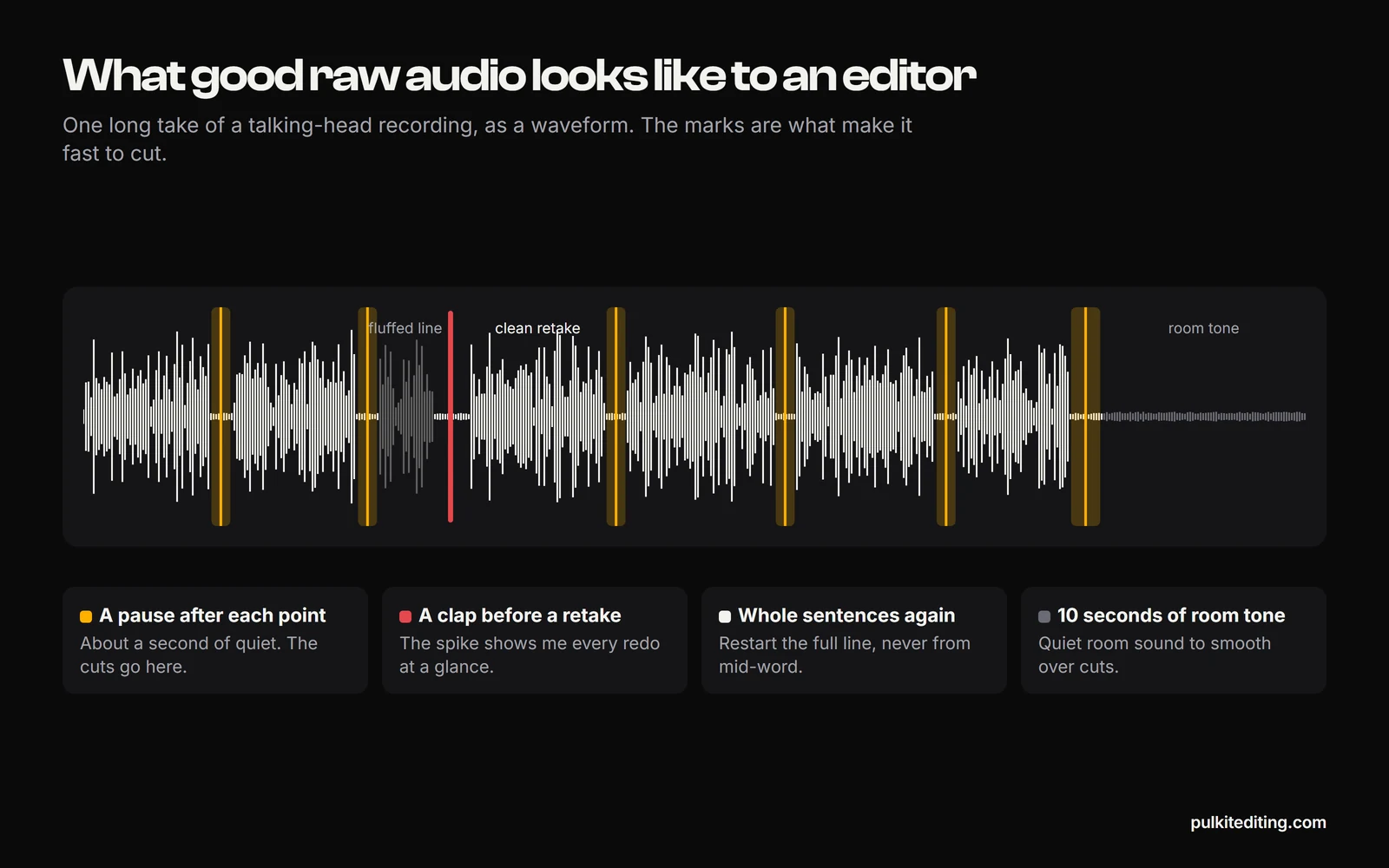
- Pause for about a second between points. Those gaps are where the cuts go, and they get trimmed anyway.
- Messed up a line? Stop, pause, and restart the whole sentence. A complete sentence can be swapped in; half of one usually can't.
- Clap once before a retake. The clap shows up as a spike in the audio, so I find every retake in seconds.
- Keep rolling. One long file with clean restarts edits faster than thirty short ones, and the framing stays identical.
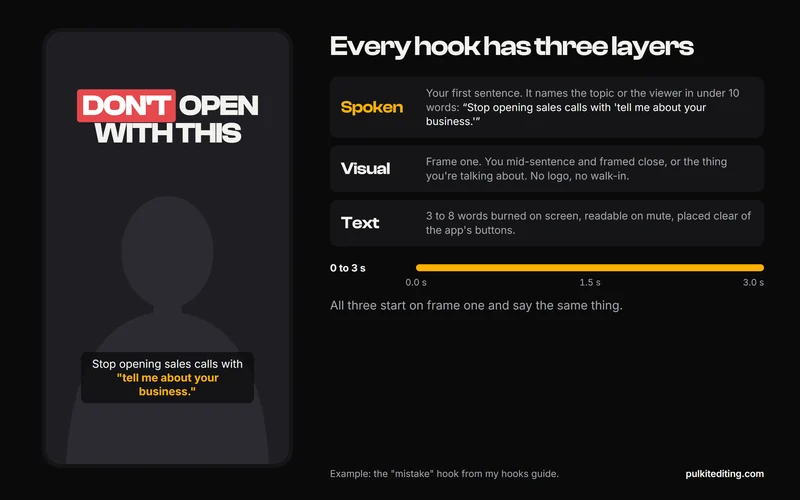
- Write your hook word for word and keep the rest as 3 to 5 bullet points. Reading a full script usually sounds like reading. If you need a teleprompter app, place the text right below the lens.
- Bring a bit more energy than feels natural. The camera flattens people.
- Record your hook three ways. I pick the strongest, and the others can open later posts. The hook formulas help here.
- After your last line, hold still and look at the lens for 2 seconds.
- At the end, record 10 seconds of the room in silence. Editors use that room tone to smooth over cuts.
- Recording sound on a separate device? Clap once on camera at the very start so the sound can be lined up with the picture.
B-roll worth filming while you're set up
B-roll is the footage that plays over your voice, and you are the only one who can film your own world. Shoot 5 to 10 seconds of each, phone steady, in the same orientation as your main video:
- your hands doing the work: typing, writing on a whiteboard, packing an order,
- your workspace or shop, plus one slow walk-through,
- your team in a meeting or on a call, with their permission,
- your product up close from a few angles,
- you arriving or setting up, for openings and transitions.
For screen recordings, turn off notifications, close unrelated tabs, zoom the page to 125 to 150% and move the mouse slowly.
How to send footage to your editor
Send the original files through Google Drive, Dropbox, WeTransfer or AirDrop. A normal WhatsApp video is compressed, even on the HD option; if WhatsApp is the only way, attach the file as a Document, which sends the original.
Use one folder per shoot with the date and topic in the name:
2026-11-07_pricing-mistakes/
  01_main-camera/
  02_audio/
  03_b-roll/
  04_screen-recordings/
  05_brand-and-screenshots/
Add a short note: what each video is about and who it is for, the hook take you liked, anything to cut (a client's name, a wrong number) with a rough timestamp, the call to action, and when you need it back.
The one-page checklist
- Before: one idea per video, hook written word for word, last line decided.
- Phone: back camera, 4K, 25 fps in India (30 in the US and Canada), HDR off, focus, exposure and white balance locked.
- Setup: tripod at eye level, framed mid-chest up, face in the middle, soft light at 45 degrees, nothing bright behind you, ceiling light off.
- Sound: clip-on mic above the sternum, AC and fans off, 10-second test checked on headphones.
- While recording: pause between points, restart whole sentences, clap before a retake, hook three ways, 2 seconds of stillness at the end.
- After: room tone, B-roll, original files in one dated folder with a note.
The same checklist as a printable PDF, with sources: download the Raw Footage Checklist.
What this footage turns into
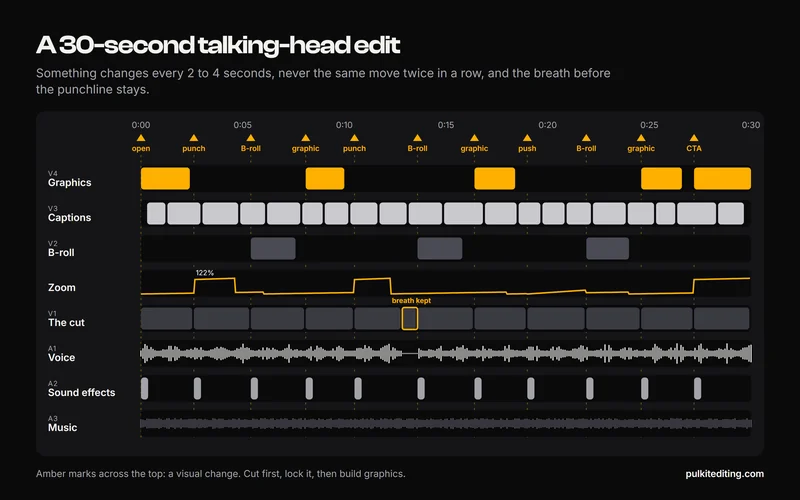
These are talking-head reels I edited. Play one to see where the cuts, captions and graphics land.
Questions people ask
What is the best phone setting for a talking-head video?
Record in 4K with the back camera, HDR off, and focus, exposure and white balance locked on your face. In India, record at 25 fps if your indoor lights flicker at 30; it matches the 50 Hz mains supply.
Should I record a talking-head video vertically or horizontally?
Vertically if it is only for Reels, Shorts and LinkedIn mobile. If you also need a YouTube version, record horizontally in 4K and sit in the centre, so the editor can crop a sharp vertical video out of it.
How do I read a script and still look at the camera?
Write the hook word for word and keep the rest as 3 to 5 bullet points, so you talk instead of reading. If you need the full text, use a teleprompter app with the text placed right below the lens.
Which microphone should I buy first?
A clip-on (lavalier) mic, wired or wireless. It costs less than a camera upgrade and fixes the problem viewers notice most: sound that picks up the room as much as your voice.
How should I send the footage to my editor?
Send the original files through Google Drive, Dropbox or WeTransfer, in one dated folder with a short note. Don't send them as normal WhatsApp videos, which are compressed; attach them as documents if WhatsApp is the only option.
Sources
- Why we believe something: audio and sound quality, USC Today, 2018
- Change video recording settings on iPhone, Apple Support
- Unlock the hidden 25p mode in your iPhone's camera app, ProVideo Coalition
- Best talking-head lighting setups, NEEWER
- How to choose the best lavalier microphone, Shure
- Sound reasoning: lavalier lessons, Videomaker
- Budget acoustic fixes for echoey rooms, Evetech
- How to send full-resolution photos and videos on WhatsApp, iDownloadBlog